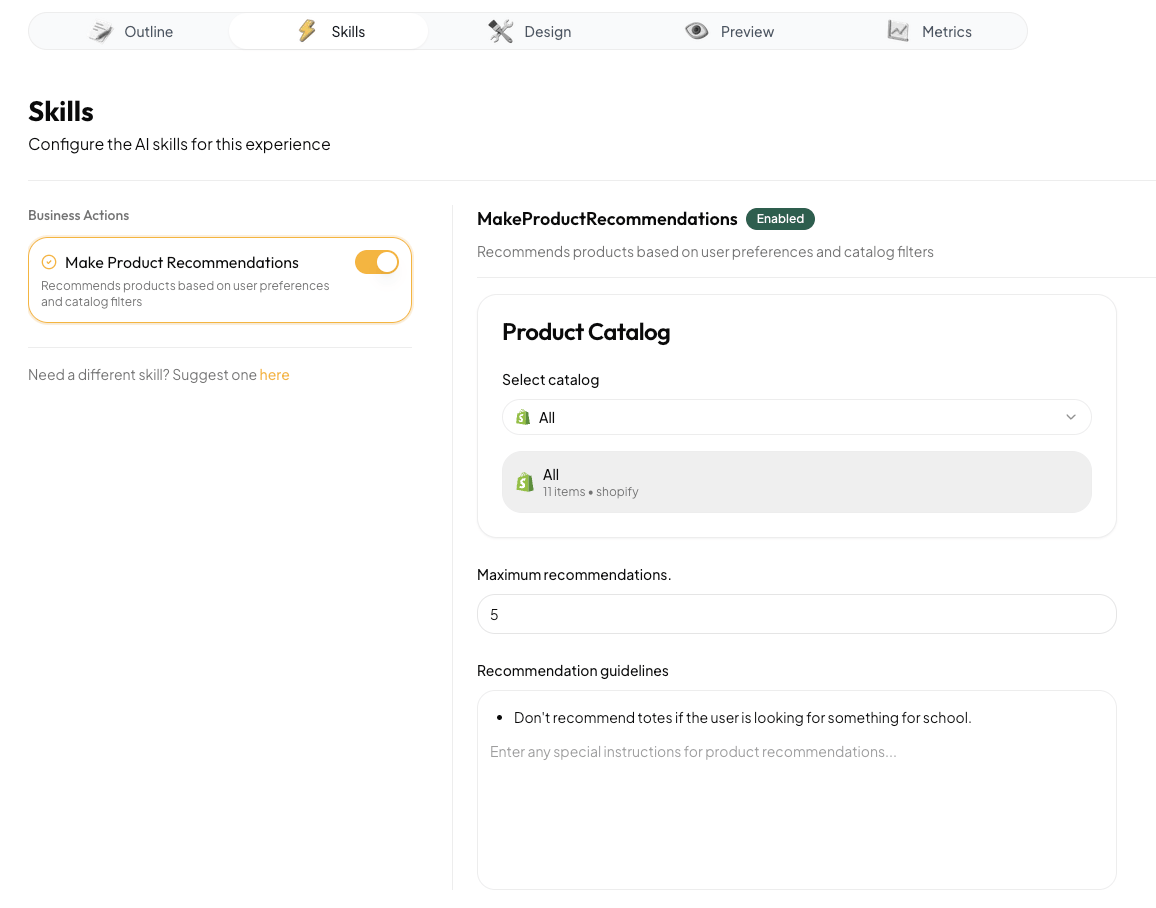
Skip to main contentTo create great experiences, Anagram experiences often need to access data, use tools, and perform actions. They can do these things using skills. The Skills tab in the Studio allows you to enable these abilities for your experience.
Enabling a skill
The Skills tab includes a list of skills that can be enabled. Some skills connect to third-part platforms (for example, to search a Shopify product catalog). Others use Anagram’s data hub. To enable a skill, click the toggle on the skill card.
Configuring a skill
Clicking on a skill card allows you to configure the skill. Each skill has its own configuration options. Skill configuration only applies when a skill is being used. Other parts of the experience don’t have access to the skill configuration.
When skills are used
The experience agent decides when to use a skill. To influence the agent that it should use a skill at a particular time, you can put instructions in the outline. For example, you could add something like, “Ask 3-5 questions, and then make a product recommendation” to the experience outline in the Outline tab.
The experience agent will also try to use skills whenever they seem relevant to the situation. For example, if a user says, “Can you recommend a backpack that can fit a 13” laptop and has a water bottle pocket?”, the agent can call the Recommend Products skill itself.
The future of skills
We’re always adding new skills and want to know what would help you build the experience you’re envisioning. If you have an idea for a skill that Anagram doesn’t currently have, we want to hear it! Click the link at the bottom of the skills list to make a suggestion. It goes straight to our team.